About Ringspace

Problem Statement
Ringspace is an attempt to revive the old concept of webrings, but with an added twist: mutual verification of identity and reputation. Historically, webrings were simply a “doubly-linked list” of sites, in which each member provided links to the previous and next members in the ring. A simple concept, brilliantly effective in its time to organize the web into discrete, discoverable communities in a time before search engines.
Today, we face a different challenge. The advent of generative AI and the transformation of the web into a slurry of misinformation and advertising have created a need for a new kind of web—a human web, in which there are different guarantees between the visitor, the creator, and peer creators in the community.
Ringspace takes the concept of a webring—a small community of creators of like mind connecting their sites—and adds to it a trust layer providing two assurances:
- Identity: “Are you who you claim to be?”
- Reputation: “Are you known to act in good faith?”
Ringspace achieves this through a hybrid model of decentralized site “manifests” and a central coordination server that performs validation, updates member sites on changes in the ring, and also handles trust and safety concerns for the ring.
This repository provides everything necessary to get started with the Ringspace “protocol,” including the manifest specification, server API specification, and reference implementation.
Name
The name “Ringspace” comes from a location in James S.A. Corey’s Expanse novels. No spoilers here.
Credits
Ringspace was created by Michael Taggart of The Taggart Institute.
License
The Ringspace Protocol, Server, CLI tool, and browser extension are free and open source works licensed under the GNU AGPL v3.0.
Ringspace Protocol Overview
The Web of Trust
What would it take to establish a closed network of creators who afforded some guarantee of humanity and verified identity to both visitors and other members of the network? Uses need two guarantees about a site in order to “trust” it.
- Identity: “Are you who you claim to be?”
- Reputation: “Are you known to act in good faith?”
No single site can provide these guarantees for itself. An HTTPS certificate does not guarantee identity; it only tells the user that their traffic is encrypted and that the encryption keying material follows a known chain of trust. Neither of those is about identity as we care about it here. Our concern is whether a site is an upstanding member of a trusted community: the webring. To establish our own chain of trust, we might try relying on other members of the ring to verify identity in some way. But mutual webs of trust like that fail in predictable ways, like gaps in the web (one member doesn’t trust the others or intentionally excludes another node) or coordinated attacks on one node.
Certificate trust relies on root certificate authorities that browsers and other HTTP clients have agreed to trust, based largely on reputation. There’s a starting point.
I think a webring with a trust layer needs one too. We’ll call this the “ring server.” Its job is to poll members of the ring for a consensus about identity and reputation—more on reputation later.
The broad strokes look like this:

The ring server provides a “polling place” for members of the ring to contribute their vote on the identity and reputation of other members of the ring. The server compiles the responses and reports back the results to anyone asking—a user visiting the site in question. That user is provided with more than just a checkmark, but a full story about what the ring thinks about this site: whether the identity matches expectations, and whether they are in good standing.
Design Details
Keep in mind this is work in progress, a proof of concept, and many implementation details remain. Still, this can be a solid starting point.
Each member of the ring produces a Ed25519 keypair for signing data. The private key is of course kept private. The public key is shared to other members and the ring server. Each member publishes a manifest containing their site’s details, including name, URL, description, and public key. There’s more in there as well, but we’ll get to that. The common location for the manifest is at .well-known/webrings.json underneath the web root. This manifest is signed by the site’s private key. When a user asks to verify a site, the site provides its manifest, allowing the server to compare the provided public key and signature with what the server has on record. The result is returned to the user, along with the voting results from the ring for the given server.
How does the ring server get the public keys in the first place? An invite code in the form of a UUIDv4 is created on the ring server, tied to the URL of the invited member site. The joining member submits a join request to the ring server’s API with the invite code and site details, including their public key. The invite code serves as authentication for this request, and should be shared by some other secure means. Ringspace does not provide the totality of what a community requires for communication; it is assumed other channels are available.
Keep in mind: inefficiency is a design goal in this system. In fact, we happily answer “No” to that most insipid of technology questions: dOeS iT sCaLe??
A webring should be a small group. Otherwise you’re not really building a human community that trusts one another anyway.
So that’s identity sorted. What about reputation?
Reputation Tracking
For me, reputation concerns human-generated material on the site, but you could imagine reputation meaning something much different for a certain webring. It might include topicality, accessibility standards, or tone. Whatever the community decides is worth upholding. So while we’re asking sites to vote on identity, we might as well ask them to vote on reputation as well. To keep it simple, the vote will comprise a binary for good_standing and a categorical string for reason. By categorical, we mean there would be a limited set of values accepted for that field—whatever the ring administrators decide.
This is where things start to get really interesting. If the votes are in sites’ manifests, you could imagine that a site being voted down would want to know who’s accusing them of what. If the vote is in the manifest, the accuser is public. That’s a safety issue, as it makes anyone voting against a site a potential target for retaliation. If we’re building a better web, we can’t introduce obvious attack vectors like that.
In addition to the site’s data, each member site manifest contains voting data on other members of the ring. A vote consists of a Standing—Good, Bad, or Neutral—and a description of the vote.
Why just three voting options? Why not a 1-10 scale, or 1-100? Voting should be simple, and provide strong signals to users about the reputation of a given site. A 1-10 scale where everyone votes 7 is not a strong signal. The Neutral option is available for the noncomittal.
One important distinction between a site’s manifest and a ring server’s manifest is that the server advertises two keys: the signing key, and a x25519 public encryption key. While Ed25519 is great for signing, it is inappropriate for encryption. Luckily, the libsodium library offers the sealed boxes scheme for encrypting the votes with the ring server’s public encryption key. This guarantees that votes are only readable by the ring server. While sealed boxes do not guarantee provenance as signatures do, the member uses their signing key for that purpose.
The presence of a vote is apparent in the manifest, as the encrypted votes are visibly keyed by the vote subject URL. And even when users request validation of a site, the returned data is anonymized such that a vote breakdown is provided, along with an unlabeled set of descriptions. This provides context without clear attribution, for the protection of ring members.
Does this require significant trust in the ring server? It does, but since at least the presence of a vote would be visible in each manifest, there is at least a publicly verifiable record that a vote for (or against) a site exists, even if its content is not readable by the public.
Just as with identity, the server responds with the result, including reasons for negative votes. This allows users to accept the risk of reading the site if they so choose. That said, well-maintained rings would eventually take action against sites in poor standing, by means of revoking their public key.
An important role of the ring server is to track vote history of each member. This is to identify patterns of abuse. While public histories are anonymized, the ring administrators have a full audit trail to correlate voting activity.
Distributed Information
While the ring server provides an essential coordination role, the majority of the information comprising the ring is kept in each member’s webrings.json file. These manifests all contain the following data:
- Site-specific data (URL, public key, last updated timestamp)
- Ring server data (URL, public key)
- Votes (per-URL, vote data encrypted with server’s public key)
- Manifest signature (algorithm, signature, timestamp, original information)
With this simple manifest and a coordination server, a closed network of sites can begin to establish trust. New sites can join the ring, provided there is some mechanism for existing sites to be informed about new additions (working on that). The server can provide updated member listings upon request, or via another mechanism like an RSS feed. The latter would be particularly useful in helping to automate the update of member manifests.
Do We Really Need a Server?
This question comes up frequently in design conversations around distributed trust. How important is the hub—can we just do Oops! All Spokes? Initially, the design of Ringspace minimized (or omitted altogether) a coordination server, attempting fully peer-to-peer organization. Why was this abandoned? Roughly for the same reason you want root certificate authorities and moderators on social media. Without a central point of trust and enforcement, the possibilities for abuse are significant. Take voting for example. The central server affords the ring the ability to encrypt all votes with a single shared public key. Absent this, the most reasonable approach would be to advertise votes in cleartext—after all, how else could a user hope to see any information from them? With votes in cleartext, suddenly voters can be the targets of brigading and other forms of retaliation.
TL:DR; the server is a compromise between safety and full decentralization. I’m leaning on safety.
Ring Reputation
Ringspace does not provide a mechanism for ring reputation, although one could certainly be built on top of it. This is because I don’t actually think rings need to prove their reputation as rings. It’s not the case that people will (or did) go browsing for webrings and find one they liked. Instead, they found individual sites they liked, and discovered they were part of a ring. They then explored that ring and learned to trust other sites. Put another way, the trust is bottom-up, not top-down. As such, trust in the ring proceeds from trust in member sites.
This also somewhat mitigates the notion of a crop of malicious, slop-filled rings springing up trying to trick the user into trusting them merely by virtue of being in a ring. That’s not how it works. The individual sites have to gain trust first, and then the ring becomes trusted.
Site/Ring management
Handling all aspects of a ring, either as a ring member or administrator, can be daunting. That’s why the reference implementation provides a single binary that serves as site CLI tool, ring CLI tool, and even the API server itself! One ringspace application handles all aspects of ring community management.
Multiple Rings
Suppose a site wanted to join multiple rings. The structure of webrings.json allows this. It would even be possible for a site to have a Good reputation in one ring, but a Bad rep in another.
Threat Model
No trust system is perfect, and what I’m proposing here has some tried-and-true attack vectors.
Server Attacks
The use of a central server exposes the ring to compromise if the ring server itself is compromised. If a malicious actor gains control of the server, vote histories could be manipulated, additional sites added to the ring, sites removed from the ring, etc. Defending this server is a top priority for a ring community. Denial-of-service attacks are also of concern, so strategies like replication, load balancing, and even deploying tools like Anubis or web application firewall in front of the server would be a best practice.
PKI Compromise
Should any private key in the ring—including the server’s—be leaked, the ring could be compromised. A single site’s private key disclosure would allow spoofing of the site and a malicious actor to potentially submit fraudulent votes. One way to defend against this is to require both the private key for the keypair and an API key for the ring server. Is this true multi-factor authentication? Kinda, since arguably the private key is something you have, and could even be stored on dedicated hardware. For now, the a signature of requests with private keys serves as authentication and authorization. I’m trying to keep complexity down here, but nothing precludes the addition of more complex authentication to this technology if desired.
Ring Splitting
This one is as much a feature as a threat vector. One or more sites could decide to take their public keys and go elsewhere, establishing a new ring and web of trust. Assuming everyone plays ball with webrings.json and doesn’t modify their own server to look at a separate file, pointing to a different server, even with the same key, would invalidate the manifest for the original server.
People are free to change their minds and make new rings. That part is not a threat, per se. If so many people in a ring leave that the ring loses quorum, then yes, that would have significant impact. But that needs to be a choice people can make. On the other hand, a site hosting multiple manifests is acting in bad faith.
Vote Fatigue
From a site owner perspective, one of the difficult parts of this scheme is maintaining votes on sites. For a 10-site ring, every owner would need to maintain 9 votes for perfect polling. We could use a “no vote == good standing” policy, but then it would become quickly evident that whoever does have a vote in their manifest is voting negatively. That defeats the purpose of encrypting the vote content. There’s a solution to this we’ll get to in the next section.
What stops someone from copying a legitimate webrings.json to a clone, modifying the content, but still claiming to be part of the trusted ring?
Well, nothing. The trick is where verification takes place. If we rely on the old webring “widgets” on the sites themselves, the potential for abuse is significant. Instead, the verification code must be in the browser itself. A browser extension reasonably guarantees that the hosted manifest is advertising the same URL/Origin as its current location. If not, the tool alerts about potential spoofing.
If an attacker attempts to change the contents of the manifest, the signature no longer verifies. If they spoof the keys to make the signature verify, the key they advertise no longer matches the server’s, resulting in a failed validation.
Vote Attacks
What if a group of ring members decides to gang up on one to destroy one member’s reputation? This is essentially indistinguishable from the design intent of the voting system. Let’s take the converse, in which a site does start acting in bad faith, and the ring responds appropriately with changed votes to reflect their displeasure. Is that “piling on?” No indeed; that’s the system working as expected.
But this is why the coordination server (and the people) behind it are so important. Fully decentralized trust and safety is no trust and safety at all. In the event of an organized “vote attack,” the ring administrators can review the votes, the reasons, and the target site to see whether the complaints are legitimate. If not, many courses of action are available. This is an area of growth for Ringspace. Potentially, admins could choose to revoke voting privileges for member sites (unimplemented), or remove them from the ring for a period of time (possible, clunky).
Manifest Specification
Sample Ring Manifests
{
  "manifest": {
    "name": "Test Ring",
    "url": "http://192.168.1.113:8000",
    "description": "A ring for testing",
    "manifest_type": "ring",
    "keyset": {
      "keys": [
        {
          "kty": "OKP",
          "crv": "Ed25519",
          "x": "NjClgero69BySgTSP5dpNUOIMn7jvFEB3WqV_l_Aw2o",
          "kid": "bbfe469e489049226a5f23790e9a6df4b4d1572fc11f9a44ac26ad9ca358395b",
          "alg": "EdDSA",
          "use": "sig"
        },
        {
          "kty": "OKP",
          "crv": "X25519",
          "x": "w5I72skiVbk6xuqC4_PBtvoFww-wTJgCeamltQe9thY",
          "kid": "0d4acb3c81f53048433d7519c0f89ce08c9b0b7aaede98f8a93f95385385300a",
          "alg": "ECDH-ES",
          "use": "enc"
        }
      ]
    },
    "members": {
      "http://site1:8001": {
        "description": "Site 1",
        "keyset": {
          "keys": [
            {
              "alg": "EdDSA",
              "crv": "Ed25519",
              "kid": "fe1a7aa43cfb5d603bb4e9ed9dc4845e5686e2d8308107041ad5272c27b3f8df",
              "kty": "OKP",
              "use": "sig",
              "x": "SHR0Q1VYTnhTVkF0cmVzbFNsNTFTYTBaYl84V1ZlYzZ5TWpYYUR2a0ppYw"
            }
          ]
        },
        "name": "Site 1",
        "standing": "good",
        "url": "http://site1:8001"
      },
      "http://site2:8002": {
        "description": "Site 2",
        "keyset": {
          "keys": [
            {
              "alg": "EdDSA",
              "crv": "Ed25519",
              "kid": "176bc682fb2810b6e9970ffe82c48989a430aaa027f37cb16122a39e78da6c96",
              "kty": "OKP",
              "use": "sig",
              "x": "c3dmUU1DVWNmMmZMRUY2dmZHQ1NuUkJKVFVpdVJJTFlObW9aUm5JZGgwRQ"
            }
          ]
        },
        "name": "Site 2",
        "standing": "neutral",
        "url": "http://site2:8002"
      }
    },
    "timestamp": 1775488042
  },
  "signature": "-cGPJZtB6w5rFccjmKiK8QAVC1xTSO5sdZ6PWlUsd4GUXbFgTXdrzG9TA09xfPWB6zhxiUy2IMTnNUfQ9_WwCw"
}
Sample Site Manifest
{
  "manifest": {
    "name": "Site 1",
    "url": "http://site1:8001",
    "description": "Site 1",
    "manifest_type": "member",
    "manifest_version": 2,
    "keyset": {
      "keys": [
        {
          "kty": "OKP",
          "crv": "Ed25519",
          "x": "HttCUXNxSVAtreslSl51Sa0Zb_8WVec6yMjXaDvkJic",
          "kid": "9d2cb51ae91c4eb4ae582d92b3b0b18abce52816d41211ab93a9d9faa7ed0b3a",
          "alg": "EdDSA",
          "use": "sig"
        }
      ]
    },
    "rings": {
      "http://192.168.1.113:8000": {
        "description": "A ring for testing",
        "keyset": {
          "keys": [
            {
              "alg": "EdDSA",
              "crv": "Ed25519",
              "kid": "bbfe469e489049226a5f23790e9a6df4b4d1572fc11f9a44ac26ad9ca358395b",
              "kty": "OKP",
              "use": "sig",
              "x": "NjClgero69BySgTSP5dpNUOIMn7jvFEB3WqV_l_Aw2o"
            },
            {
              "alg": "ECDH-ES",
              "crv": "X25519",
              "kid": "0d4acb3c81f53048433d7519c0f89ce08c9b0b7aaede98f8a93f95385385300a",
              "kty": "OKP",
              "use": "enc",
              "x": "w5I72skiVbk6xuqC4_PBtvoFww-wTJgCeamltQe9thY"
            }
          ]
        },
        "name": "Test Ring",
        "votes": {
          "http://site2:8002": "mErgdxwJuVwgJXnzzSYwzTufNgplLlaI-GSotBWTMUXaJuHKqWsqmxYWbfd9jpskhwdAuCwIaxkywGtttZ0BJZJ3xr2qhObfqysyM2bREbwR8kPK52FHv0PKIz3FHuMb_D60zP5CYUKlvX5Tb8-67StFHAtGMoMJgH3JR0t_NnkTuEPUhfaMdhiTdUrGqKgTit8oBs--IwbGoDKBpstqEAAh7oYatMiN2d4oR_aUQE_VD7yBnI3r4UKLTEw"
        }
      }
    },
    "timestamp": 1775488091
  },
  "signature": "ES0vjngExy6MhgM4HFsj3qz1mkznx3G7-I2IZ7ZLoMuTIyzNquBz0Pp7MOi_1Ga19S9LYzLi0gREf-meyA98CA"
}
Votes
Vote objects are encrypted with the ring server’s public key, but they follow this structure:
{
  "description": "Great stuff",
  "standing": "good",
  "timestamp": 1765492040,
  "vote_subject_url": "https://alice-zone.net"
}
JWKS
Ringspace exchanges keys in JSON Web Key Set format. Any time a keyset field occurs, the value is a JWKS. This allows for a more conventional, standard key exchange mechanism, and future adoption of additional ciphers/key types. The x field is the public key in Base64URL (URL Safe, no padding) format.
Getting Started
Installation
Ringspace can be installed multiple ways. At present, installation relies on the cargo toolchain from the Rust language.
If you do not have Cargo/Rustup installed, visit here first.
Build From Source
This is the recommended path, since it guarantees you have everything you need for Ringspace to run.
git clone https://codeberg.org/mttaggart/ringspace
cd ringspace
cargo install --path ./
Important
When
ringspaceruns as a server, it should do so from the repo directory. Thestaticandtemplatefolders must be accessible for the server homepage to function.
Direct Installation via Cargo
The Ringspace binary can be installed using cargo.
cargo install ringspace
Warning
This option will not install the
staticandtemplatefolders from the repository and is only recommended for site management.If you intend to manage servers and installed via this path, download the repo and copy the
staticandtemplatefolders to whereverringspaceruns from.
Binary Download
Pre-compiled binaries are available on the releases. At present, builds for Linux x86_64 and ARM64 are available.
Running a Server
ringspace server is the subcommand to initialize a server. It can be initialized for a specific Ring and on a specific port. See the CLI docs for more information.
This service should not be exposed directly to the internet. I recommend a reverse proxy such as Caddy as your internet-facing server.
If running Ringspace directly on a server, consider using Systemd or another method to manage it as a service.
.env
Ringspace honors a .env file to set certain values. The repo’s example.env is represented here:
# Database URL: See https://docs.rs/sqlx/latest/sqlx/sqlite/struct.SqliteConnectOptions.html
RINGSPACE_DATABASE_URL="sqlite:///data/ringspace.db?mode=rwc"
# Used for containerized deployments. Should almost always be 0.0.0.0
RINGSPACE_LISTEN_ADDRESS="0.0.0.0"
# HTTP port for containerized proxy
RINGSPACE_HTTP_PORT=8080
# HTTPS port for containerized proxy
RINGSPACE_HTTPS_PORT=8443
# Actual server listen address. Use this to change where the actual server listens
RINGSPACE_ROCKET_ADDRESS="0.0.0.0"
# Actual Server Listen Port
RINGSPACE_ROCKET_PORT=8000
# Startup Managed Ring details for containerized deployments
RINGSPACE_RING_NAME="Example Ring"
RINGSPACE_RING_URL="https://example.com"
RINGSPACE_RING_DESCRIPTION="An example ring"
The server listen address and port can be set my command line as well with ringspace server. Precedence goes:
Command line options -> Enviroment variables -> Built-in defaults.
Even if it’s an empty file **Ringspace expects a .env, so at the very least, put a placeholder in your working directory.
touch .env
Docker/Podman Deployment
The repository contains everything you need to get up and running with a containerized deployment.
Set .env.
cp example.env .env
Set the values as desired. Confirm no listen port conflicts. The containerized app will set the managed ring defined by the environment variables as the default ring and serve it.
Build Base Images
docker compose build
Set up Caddyfile
cp Caddyfile.example Caddyfile
Set host information as desired. The upstream hostname (ringspace) must match the container_name in docker-compose.yml.
Launch a Server
docker compose up -d
Interact
To run ringspace commands, you can use exec directly:
docker container exec -it ringspace ringspace site add
Or you can initialize a shell:
docker container exec -it ringspace /bin/bash
ringspace ring add
Rings
This section walks through ring management.
Create a New Ring
In a folder of your choosing, run ringspace ring add. You can add the optional parameters, or let the wizard walk you through it. Use the -f option to set this as the default ring (you can manage multiple rings). You can run ringspace ring set-default later if you forget. When you’re done, a new ringspace.db Sqlite3 database will exist in this folder. This will hold all the information about your rings and sites. When you run the server, you must run it from a directory with this file!
Launch the server
Run ringspace server to launch the server on port 8000 by default. Make sure the command is running from a directory with the static and templates folders from the repo present.
It would be a good idea to run this behind a reverse proxy of some kind. This process should also probably be managed by a Systemd Service or similar persistence mechanism
You can use the -p option to specify what port to run the server on, and -r to specify the Ring URL, if you’re managing multiple rings.
Invite Sites
Identify a site you want to join the ring! It could be yours, or someone else’s. Once both parties have Ringspace installed, run ringspace invite create -u https://new-site.com to create a new invite code. This invite code will be what you share with the other party. When they’re ready, they will make a join request with that code. Be aware that by default, invite codes expire in 72 hours! You can alter that with the ---expiration-hrs option on ringspace invite create.
Fetch Votes
Sites will vote on each other, and you need to collect that data. Schedule a job to run ringspace ring fetch-votes to reach out to all member sites and collect new vote information. Your server will provide updated manifests on demand, but the vote information must be collected.
Site manifests store only the most recent vote for a given vote subject. This is to prevent creep in the manifests, and to represent that voters can change their minds. However, the Ring has a cooldown period. New votes will not be accepted within 24 hours of a previous vote.
Sites
This section discusses site management from the perspective of a site owner, rather than a ring owner.
Site Installation
Follow the Installation instructions above to get the ringspace binary accessible on your system.
Setup the Working Directory and Database
In whatever working directory you wish, create a .env file placeholder (if there isn’t already one) and initialize the database. Remember you can use the .env file to set RINGSPACE_DATABASE_URL to determine where the database lives.
touch .env
ringspace migrate
I recommend not using your website’s Git repository for this work, because it would be all too easy to check the database file into version control.
Warning
If your Ringspace database is published in Git, you need to immediately contact ring managers to revoke your keys and re-join the ring. The database contains private keys, which if exposed can be used for spoofing manifests and key rotation requests.
Create a New Site
To make a site instead of a ring, run ringspace site add. Again, use the option flags or the wizard to walk through the creation. Use -f to mark a site a default on creation, or run ringspace site set-default later.
You can create as many sites as you like!
Join a Ring
With an invite code in hand (see above), run ringspace site join-ring -c invite-code-here. Specify the site you’re joining to the ring as necessary with -u, otherwise the default site will be assumed. If successful, your database will be updated to show that site as a member of that ring, which will be reflected in new manifest creations.
Create a Manifest
You create a new manifest any time you make a change to the site, including:
- Votes
- Key Rotation
ringspace site manifest (with an optional -u for non-default sites) will print the manifest JSON to the terminal. Place this in a file called webrings.json in a folder called .well-known underneath the web root of your site. So the full path to the manifest is https://your-site.com/.well-known/webrings.json.
Doing this from your Ringspace working directory looks like:
ringspace site manifest > /path/to/webroot/.well-known/webrings.json
Ringspace output is all designed to be jq and Unix philosophy-friendly. I recommend considering some automation with a script or Justfile to streamline the process to your comfort level.
Vote on Sites
You can manually add a single vote with ringspace site vote, but the easier way to do this is ringspace site vote-wizard. The Vote Wizard fetches the ring manifest, looks for all current members, and prompts you for votes on all of them. This helps make sure everyone has votes for other members in their manifests!
Rotate Keys
If you need to rotate your published keys, run ringspace site rotate. A new keypair will be generated and your joined rings will be queried with the new key data and a signature made with the old key. If any rings fail to update, this command will revert the change on all successes, guaranteeing that there are no discrepancies between rings and your keys. Only after a full remote rotation will your local keys be changed.
Leave a Ring
If you want to depart a ring, it’s as simple as ringspace site leave-ring -r https://ring-url.com. The departure request will be processed on the ring server, and you’ll be marked as unenrolled. Your local membership record will be removed, but not the ring data itself (you might have other sites that are still members!).
Ring Server API Specification
Authentication/Authorization
API requests are authenticated and authorized via pre-shared API keys
API Base
The base URL is /api
Server Information
GET /manifest
Retrieve the canonical manifest for the ring.
Validation
POST /member/validate
Performs validation checks for the given site. Takes the site’s manifest/signature as a body.
Returns a JSON object containing the validation status.
{ "result": "success" }
Standing
POST /member/standing
{
  url: https://bobsawesomesite.com
}
Queries the ring for standing data. Returns a JSON object containing standing, vote breakdown, and anonymized descriptions.
{
  "standing": "Good"`
  "vote_split": {
    "good": 2,
    "bad": 0,
    "neutral": 1
  },
  "descriptions": [
    "Nice stuff here!",
    "Could be easier to read",
    "I like this site a lot"
  ]
}
Member Management
POST /member/invite/redeem
Redeems an invite code with data from the invitee to create a new Member record.
{
  "invite_code": "random-invite-code",
  "site_url": "https://example.com",
  "url": "https://alice-zone.net",
  "name": "Alice's Zone",
  "description": "A to Z Cryptography",
  "keyset": {
    "keys": [
      {
        "kty": "OKP",
        "crv": "Ed25519",
        "x": "HttCUXNxSVAtreslSl51Sa0Zb_8WVec6yMjXaDvkJic",
        "kid": "9d2cb51ae91c4eb4ae582d92b3b0b18abce52816d41211ab93a9d9faa7ed0b3a",
        "alg": "EdDSA",
        "use": "sig"
      }
    ]
  }
}
Returns key data for the ring to the requester, upon join.
POST /member/rotate
Rotates a member’s public key. The request contains the URL, old key, the new key, and a signature of the request payload.
JSON body:
{
  "request": {
    "new_key": "some_base64url",
    "old_key": "some_base64url",
    "member_url": "https://alice-zone.net"
  },
  "signature": "more_base64url"
}
If rotation successul, returns:
{
  "result": "success"
}
POST /member/unenroll
Unenroll from a ring. The body is the member URL, and a signature of that payload.
{
  "request": {
    "member_url": "https://bobsawesomesite.com"
  },
  "signature": "base64_signature_of_request"
}
Success returns:
{
  "status": "unenrolled"
}
CLI Usage
The Ringspace binary is an all-in-one tool for site and ring management. The top-level commands are:
Usage: ringspace <COMMAND>

Commands:
  ring     Manage a Ringspace Ring
  member   Manage Ring Members (as a Ring manager)
  site     Manage a Ringspace Sites (as a site owner)
  server   Launch the Ringspace Server
  invite   Manage Invites
  enckey   Generate an encryption keypair
  signkey  Generate a signing keypair
  migrate  Perform any necessary database migrations between versions
  help     Print this message or the help of the given subcommand(s)

Options:
  -h, --help  Print help
Ring Commands
Manage a Ringspace Ring

Usage: ringspace ring
       ringspace ring create [OPTIONS]
       ringspace ring list
       ringspace ring get [OPTIONS]
       ringspace ring delete --ring-url <RING_URL>
       ringspace ring set-default --ring-url <RING_URL>
       ringspace ring decrypt-vote [OPTIONS] --encrypted-vote <ENCRYPTED_VOTE>
       ringspace ring manifest [OPTIONS]
       ringspace ring fetch-votes [OPTIONS]
       ringspace ring help [COMMAND]...

Options:
  -h, --help  Print help

ringspace ring create:
Create a new ring
  -n, --name <NAME>                Ring Name
  -r, --url <URL>                  Ring URL
  -d, --description <DESCRIPTION>  Ring Description
  -f, --default                    Set as default
  -h, --help                       Print help

ringspace ring list:
List rings
  -h, --help  Print help

ringspace ring get:
Get ring by URL
  -r, --ring-url <RING_URL>  Ring URL
  -h, --help                 Print help

ringspace ring delete:
Delete ring
  -r, --ring-url <RING_URL>  Ring URL
  -h, --help                 Print help

ringspace ring set-default:
Set default ring
  -r, --ring-url <RING_URL>  Ring URL
  -h, --help                 Print help

ringspace ring decrypt-vote:
Decrypt a single base64-encoded vote from a site
  -r, --ring-url <RING_URL>              Ring URL (default if omitted)
  -v, --encrypted-vote <ENCRYPTED_VOTE>  Base64-encoded encrypted vote
  -h, --help                             Print help

ringspace ring manifest:
Generate Ring Manifest
  -r, --ring-url <RING_URL>  Ring URL (default if omitted)
  -h, --help                 Print help

ringspace ring fetch-votes:
Fetch Ring votes
  -r, --ring-url <RING_URL>  Ring URL (default if omitted)
  -h, --help                 Print help

ringspace ring help:
Print this message or the help of the given subcommand(s)
  [COMMAND]...  Print help for the subcommand(s)
Site Commands
Manage a Ringspace Site (as a site owner)

Usage: ringspace site
       ringspace site list
       ringspace site create [OPTIONS]
       ringspace site get [OPTIONS]
       ringspace site delete --site-url <SITE_URL>
       ringspace site join-ring [OPTIONS] --ring-url <RING_URL> --invite-code <INVITE_CODE>
       ringspace site leave-ring [OPTIONS] --ring-url <RING_URL>
       ringspace site manifest [OPTIONS]
       ringspace site rotate [OPTIONS]
       ringspace site set-default --url <SITE_URL>
       ringspace site vote [OPTIONS] --vote-subject <VOTE_SUBJECT> --description <DESCRIPTION>
       ringspace site vote-wizard [OPTIONS]
       ringspace site help [COMMAND]...

Options:
  -h, --help  Print help

ringspace site list:
List Sites
  -h, --help  Print help

ringspace site create:
Add Site
  -n, --name <NAME>                Site Name
  -u, --url <URL>                  Member Url
  -d, --description <DESCRIPTION>  Site Description
  -f, --default                    Set as default
  -h, --help                       Print help

ringspace site get:
Get Site by URL
  -u, --site-url <SITE_URL>  Site URL
  -h, --help                 Print help

ringspace site delete:
Remove Site
  -i, --site-url <SITE_URL>  Site URL
  -h, --help                 Print help

ringspace site join-ring:
Join Ring with Invite Code
  -u, --site-url <SITE_URL>        Site URL
  -r, --ring-url <RING_URL>        Ring URL
  -c, --invite-code <INVITE_CODE>  Invite Code
  -f, --default-ring               Set as default
  -h, --help                       Print help

ringspace site leave-ring:
Request unenrollment from a Ring
  -u, --site-url <SITE_URL>  Site URL
  -r, --ring-url <RING_URL>  Ring URL
  -h, --help                 Print help

ringspace site manifest:
Generate Site Manifest
  -u, --url <SITE_URL>  Site URL
  -h, --help            Print help

ringspace site rotate:
Rotate Site key
  -u, --url <SITE_URL>  Site URL
  -h, --help            Print help

ringspace site set-default:
Set Default Site
  -u, --url <SITE_URL>  Site URL
  -h, --help            Print help

ringspace site vote:
Add a Vote to a given ring/site
  -u, --url <URL>                    Site URL
  -r, --ring-url <RING_URL>          Ring URL
  -v, --vote-subject <VOTE_SUBJECT>  Vote Subject URL
  -s, --standing <STANDING>          Standing
  -d, --description <DESCRIPTION>    Description
  -h, --help                         Print help

ringspace site vote-wizard:
Run an interactive vote generator for all current Ring members
  -u, --url <SITE_URL>  Site URL
  -h, --help            Print help

ringspace site help:
Print this message or the help of the given subcommand(s)
  [COMMAND]...  Print help for the subcommand(s)
Server Commands
Launch the Ringspace Server

Usage: ringspace server [OPTIONS]

Options:
  -p, --port <PORT>          Server port [default: 8000]
  -a, --address <ADDRESS>    Server address [default: 0.0.0.0]
  -r, --ring-url <RING_URL>  Ring URL
  -h, --help                 Print help```
Important
Do not expose the Ringspace server directly to the internet. Use a reverse proxy like Caddy for resilience, rate-limiting, and more.
Invite Commands
Manage Invites

Usage: ringspace invite
       ringspace invite create [OPTIONS] --url <URL>
       ringspace invite list
       ringspace invite revoke [OPTIONS] --id <INVITE_ID>
       ringspace invite help [COMMAND]...

Options:
  -h, --help  Print help

ringspace invite create:
Create a new invitation
  -u, --url <URL>                          Member URL
  -e, --expiration-hrs <EXPIRATION_HOURS>  Hours until code expires [default: 72]
  -r, --ring-url <RING_URL>                Ring URL
  -h, --help                               Print help

ringspace invite list:
List invitations
  -h, --help  Print help

ringspace invite revoke:
Revoke invitation by ID
  -i, --id <INVITE_ID>     Invitation ID
  -y, --confirm <CONFIRM>  Confirm [possible values: true, false]
  -h, --help               Print help

ringspace invite help:
Print this message or the help of the given subcommand(s)
  [COMMAND]...  Print help for the subcommand(s)
Browser Extension
Because site validation can’t be left to the sites’ own devices, Ringspace provides a reference browser extension to demonstrate how a user might interact with a webring.
Demonstration
For this demo, I have two sites set up: http://site1:8001 and http://site2:8002. I also have a ring set up at http://192.168.1.113:8000. Forgive the local addresses; it’s testing!
I have the Ringspace extension loaded in my browser. When I visit any site, the extension makes a request to .well-known/webrings.json. If it finds a manifest, the icon changes to a “found” state.

Clicking on the icon, the Ringspace UI appearss, showing what it found.

-
The Site name, description, and public key.
-
Any joined ring information.
-
A validation button.
Clicking “Validate” queries the ring servers at /api/member/validate with the manifest information. Standing and vote information, as well as manifest validation are added to the UI. If successful, the icon turns green and a checkmark badge appears.

Errors and validation failures are noted in orange and red, respectively.


Ring Homepage
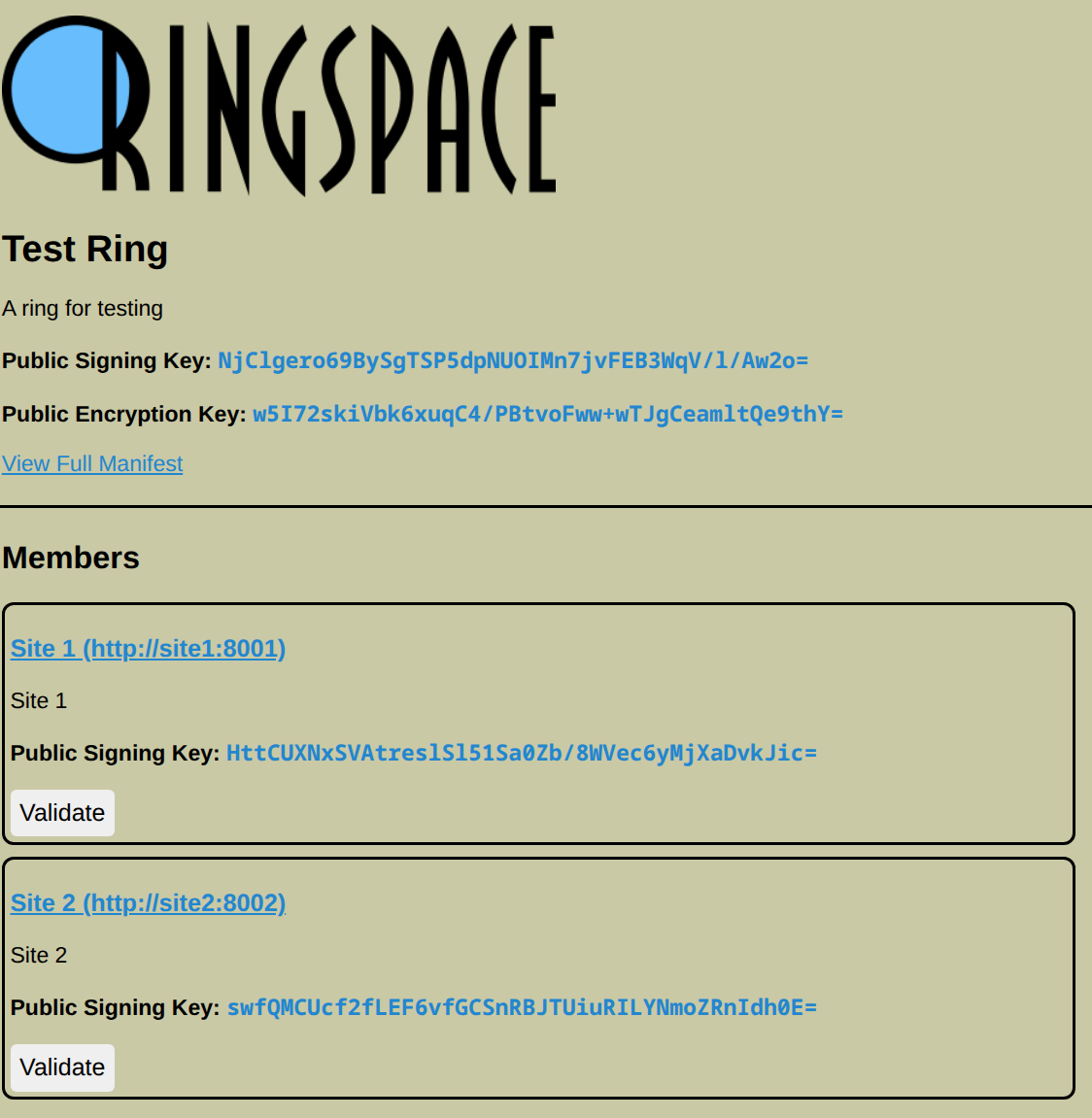
“But what about mobile?” Great question. We need a trusted way to validate sites that is not browser dependent. For this reason, the ring server hosts a homepage that:
- Advertises Members
- Performs in-browser validation of the Member manifests
Validation
Every Member site is populated from the data in the ring server’s database, including URL, description, and current public key. The “Validate” button kicks off the process of fetching data from the site’s own manifest to compare and verify.
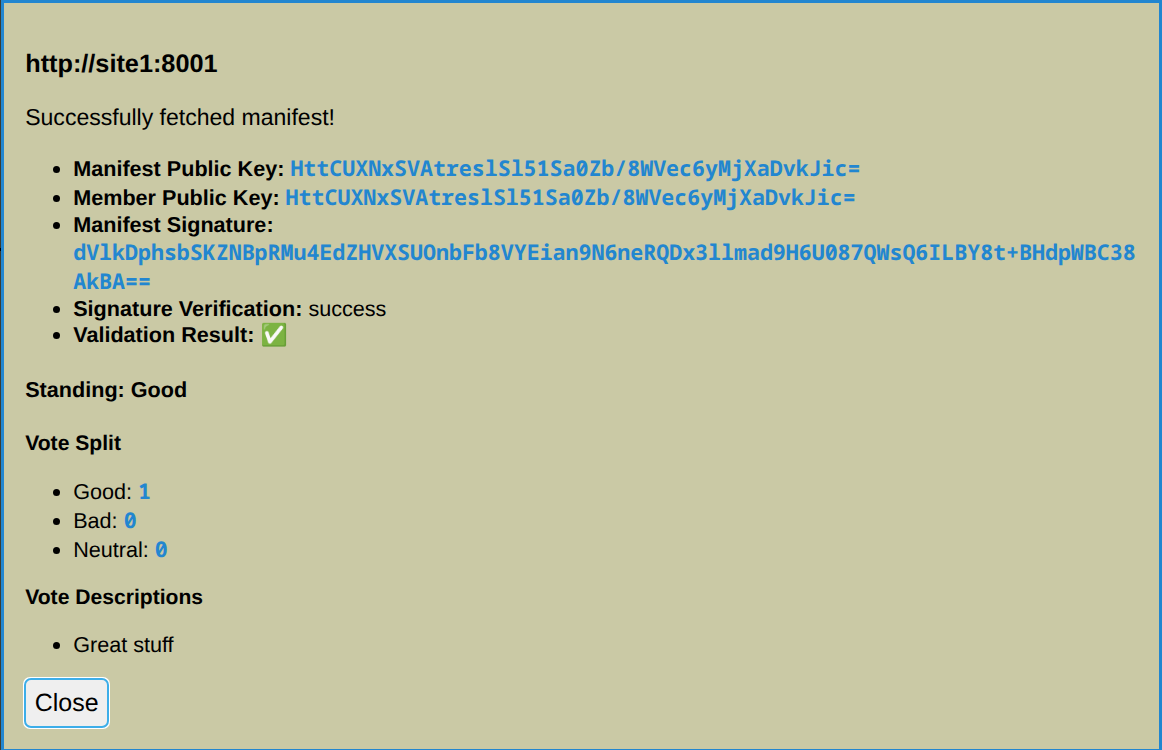
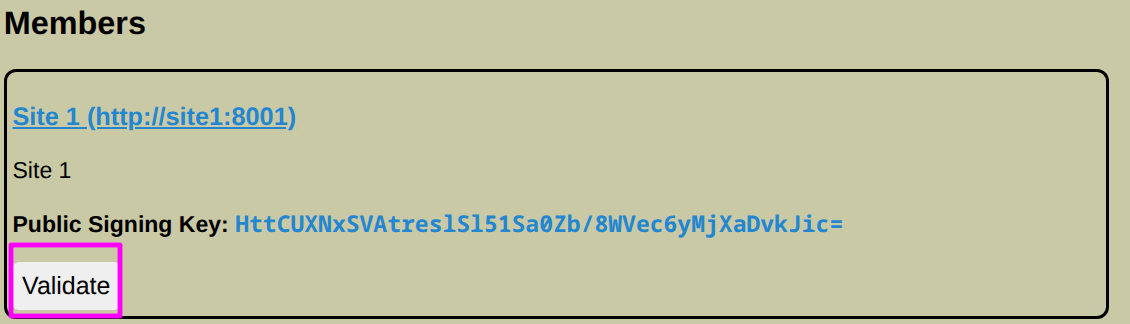 A modal dialog will appear during the operation. The validation operation comprises the following:
- Fetching site manifest from
https://site-url/.well-known/webrings.json - Comparing manifest public key to server’s known public key
- Verifying the site manifest’s signature using the ring’s own
/api/member/validateendpoint - Retrieving standing/votes for the site.
- Displaying standing, vote breakdown, and anonymized vote descriptions
Validation Notes
Some important considerations for validation.
The fetching of the manifest requires Cross-Origin access. Therefore, member sites must at least have the ring server’s URL as an allowed Origin in their web server’s Access-Control-Allowed-Origins header.
At present, signature verification is done via the ring’s own API. However, nothing theoretically prevents this from being done directly in the user’s browser via JavaScript. A future update may include this, to improve transparency.
The source JavaScript for the server homepage is not minified, and requires no external dependencies. This is for maximal transparency and readability.